
A consent architecture built for our projects, for security and data sovereignty
For our web applications we built consent management ourselves instead of outsourcing it to an external consent platform. Function, design and behaviour are ours to define; consents and their logs stay on our own infrastructure – with no third-party script in the load path and no recurring fees.
- Type
- Technical case study
- Module
- @woop-technology/
consent - Reference projects
- Woop Art
- This website
- Status
- In use | under continuous development
- Integration
- React | Next.js App Router
- Distribution
- Private package registry
- Consent architecture
- Data sovereignty
- Google Consent Mode v2
- Cookie registry
- versioned consent
- script gating
- interchangeable data sources
- multilingual content
- project-specific interfaces
- server-side logging
Why we developed our own consent management
Web applications often embed external services such as analytics, maps, videos or appointment booking. That creates additional data flows – and two questions: under which conditions these services may be loaded, and what happens to the data once it has left our own server.
The obvious answer would be an external consent platform. For us it would have brought three things we did not want: another monthly bill, a consent system that reaches only as far into the application as the vendor allows – and our visitors' consent data on someone else's servers.
That is why we developed our own consent management: as an integral part of our application architecture, reusable and adaptable – and built so that the data stays exclusively on our own infrastructure.
- 01Manage consents and storage values centrally, without an external vendor
- 02Enable services depending on consent
- 03Process consents and logs exclusively on our own infrastructure
- 04Support different languages, data sources and interfaces
- 05Be reusable, without additional fees per month or project
The result is a standalone consent engine that is used today as a shared technical module in our projects.
Three things we don't hand over
An external consent platform adds a vendor: its own scripts, its own configuration, its own servers and a recurring fee. Our own engine runs together with the application instead, within the same infrastructure and with the same tools.
What that means in practice comes down to three points.
- Costs
- No licence per domain, per page view or per month. The costs arise once in development and continuously in maintenance.That is sustainable because the same building block runs in several projects.
- Control
- Function, data basis, design and behaviour are ours to define – right into the application code, which can query the consent state directly.Nothing ends where a vendor's feature set ends.
- Data
- Configuration, consents and logs live on our own servers. No third party stores, processes or sees our visitors' decisions.
The consent function needs no external CMP
The consent configuration and the central engine are part of the application itself. No external CMP provider is therefore required for the consent system.
- no additional CMP script
- no external network request for the consent function itself
- no third-party consent interface
- no additional platform dependency solely for managing consent
Consent-dependent services remain separate from this and load only once the required consent is in place.
Less third-party code, less attack surface
An external consent script runs with the same privileges as the page itself and is loaded from a third-party server. Every version the vendor ships thus becomes part of the website without being reviewable in detail.
With established vendors that is usually unproblematic. We still prefer to know the code that runs on our pages: our own engine is versioned, reviewed and deployed like the rest of the application code.
- accepts requests from the site's own origin only
- checks every request for complete and permitted fields
- truncates the IP address before it is stored
- sits on a fixed path for which the upstream firewall can keep its own rules
Consents and logs live on our own servers
No further vendor is involved in managing consents. A visitor's decision takes effect in the application and is logged on the same server the application runs on – where the project's other data is processed as well. That applies to every project using the engine: decisions are logged locally in the container of the respective application.
Which other external services a specific project uses, and which data is transferred in the process, is defined and documented project by project, independently of this.
Three separate layers for logic, data and presentation
The consent system separates the central functional logic from project-specific data and the visible interface.
As a result, the same technical foundation can be used in different applications without having to reimplement consent state, versioning or script gating for every project.
The module ships with a standard interface that the project styles or replaces entirely. That is how the same engine runs on an art platform and on a corporate website, even though the two interfaces differ in design.
- Consent engine
- The central engine takes on the functions that stay the same across projects:
- consent state
- version check
- cookie registry
- script gating
- two-click solutions
- withdrawal
- clean-up of declared storage values
- Google Consent Mode v2
- Data source
- The engine receives the project-specific information through a defined interface. This includes, among other things:
- consent version
- categories and services
- cookies and other storage values
- texts per language
- script configurations
- Interface
- Banner and settings dialog are designed for the respective project. The interface receives the data it needs and a fixed set of actions from the central engine.This means the visual appearance can be adapted to each project without having to change the underlying consent logic.
Everything on our own infrastructure.
The figures under the reference projects apply to their respective configuration. Categories, services and cookies are freely configurable.
One shared module instead of project-specific one-offs
The consent engine is provided as its own package via Woop Technology's private package registry. Versions and changes are managed centrally; each project pins the version it needs and adopts updates on its own schedule – so different projects can run different versions at the same time.
Every new project adds four areas:
- 01Data
- Categories, services, storage values and texts.
- 02Persistence
- Where the logs of consent decisions are stored.
- 03Integrations
- Analytics and other consent-dependent services.
- 04Design
- Default interface or custom banner and settings components.
Consent state, versioning, registry, script gating and withdrawal come from the shared module. Improvements to the engine can be carried over to several projects through versioned updates.
What the engine brings, what the project decides
- 01Enginecategory-based consent, versioning, revocation, cookie cleanup, script gating, Google Consent Mode v2
- 02Projectdata source (JSON, API or headless CMS), languages, interface (standard UI or own components), integrations (hooks, two-click solutions)
- 03Persistenceconsent cookie in the browser, server-side logging, truncated IP addresses
- 04Stack & operationsReact, TypeScript, Next.js App Router, dependency injection, private package registry, validated inputs
Consent-dependent services load only after consent is given
A central requirement was not merely to disable consent-dependent services before consent is given. They should not load in the first place.
Several mechanisms work together to achieve this.
- Consent Mode starts in a denied state
- Google Consent Mode v2 is initialised with the corresponding denied storage states on the first page view. If a valid decision exists, or once consent is granted, that state can then be updated deliberately.
- No consent, no consent-dependent script
- The engine only provides integrations whose associated consent category has actually been accepted. In the reference project this means, for example: without analytics consent, no Google Analytics script is embedded.The decision is therefore not distributed across individual components but controlled centrally through the consent state.
The registry keeps technical use and documentation together
So that declared storage values and the actual implementation are not maintained independently of one another, the engine uses a central registry. Technical properties are defined for every storage value managed through the consent infrastructure.
- identifier
- cookie name or name pattern
- associated service
- category
- storage duration
- storage type
Language-dependent information such as purpose and description is maintained separately from this.
If application code attempts to write an unregistered value through the consent infrastructure, the operation is rejected. The registry is therefore not just documentation but part of the technical control.
Consent decisions are bound to a configuration version
Every consent configuration carries a version.
- consent ID
- version of the configuration
- time of the decision
- accepted categories
On a later visit the engine compares the stored version with the one currently in use. If the two differ, the engine discards the stored selection and asks for a new decision.
A newly added service can therefore be handled through a new consent version, without developing migration logic for every individual website.
A changed decision also takes technical effect
Consent can be adjusted at any time through the consent settings. If a previously accepted category is deselected, more changes than just the stored consent state.
- removes declared storage values of the deselected category
- updates Google Consent Mode
- prevents the associated services from loading again
- and, where necessary, returns the application to a clean state through a rebuild
The rebuild matters because third-party scripts that have already run cannot be reliably undone by removing their script element alone.
After withdrawal, the state should therefore match that of a visitor who never released the category in question.
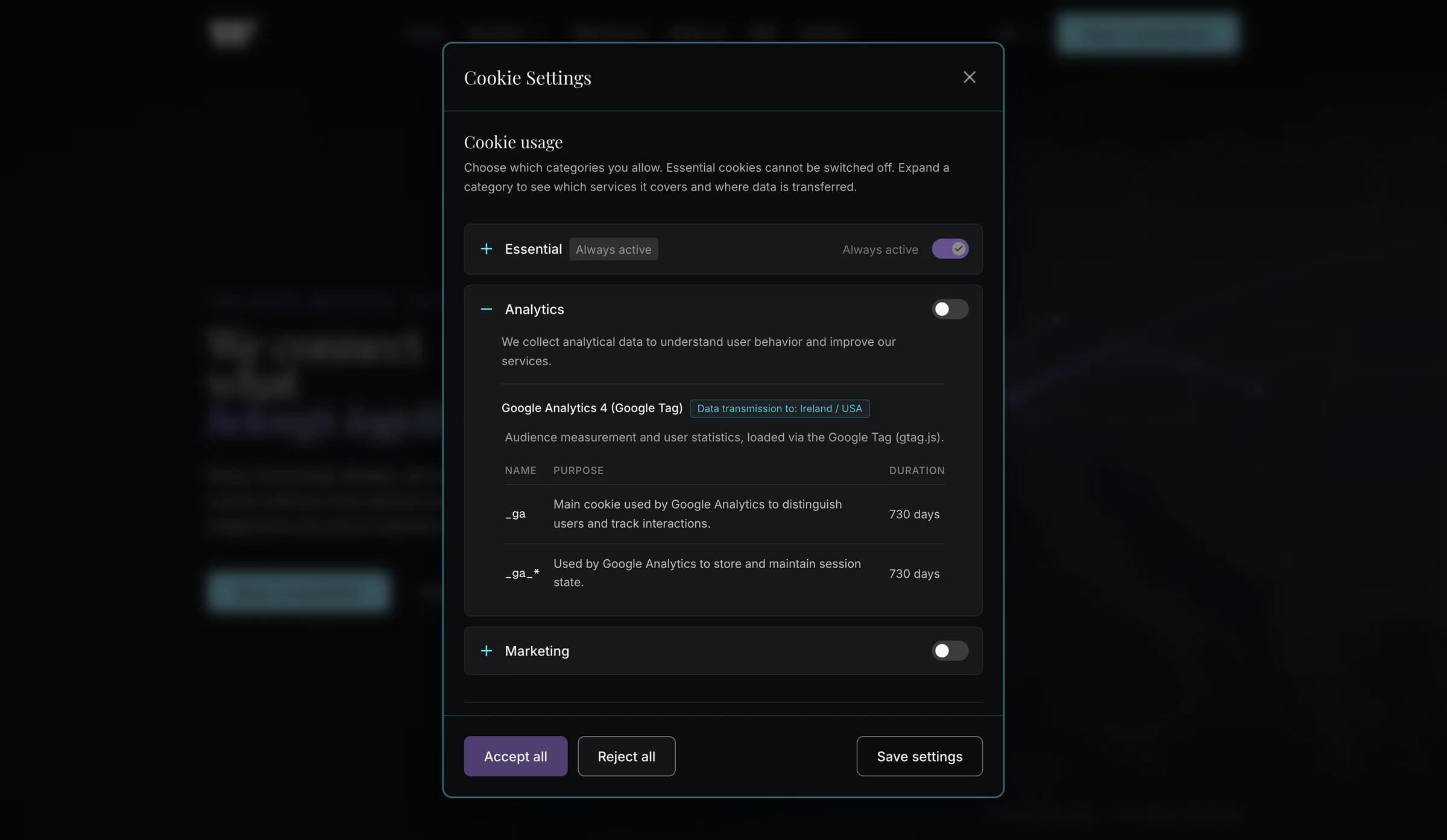
What a consent stores in the browser
Two clicks before an external service loads
Not every consent belongs in the banner. For embedded services such as appointment booking, the engine asks for it where the visitor actually wants to use the service.
- 01
First click: the notice
The button shows which provider would be loaded and which data would be transferred. Its label changes to “Load Google Calendar”.
- 02
Second click: loading
Only now are the provider's script and stylesheet included and the booking opened. Until then, no request reaches Google.
- 03
No detour via the banner
Visitors do not need to enable a category in the consent settings. The decision is made at the service itself, for that service alone.
The components for this live in the same package as the engine: ready-made for Google Calendar and Calendly, and available for other services through a shared base component.
The consent ID is one click away
Every decision is logged on the server, but it can only be found unambiguously through its consent ID. A dedicated component puts that ID within easy reach of visitors.
The ID sits in the consent cookie, where nobody sees it without developer tools. Yet it is the only unambiguous way to the entry on the server, because the IP address is stored only in truncated form.
The component displays the ID and copies it with one click. With a question, a complaint or an access request, visitors simply send it along, and the entry is found without follow-up questions – with time, version and selection.
The component sits in the privacy policy of the respective website and also leads straight to the consent settings from there.
Your current Consent ID
This unique ID is stored locally in your browser and pseudonymized on our server to prove your privacy choice. If you have questions or complaints about your consent, please include this ID – it lets us find the matching record unambiguously.
No choice made yetThe component comes ready-made with the consent package. Like the banner and settings dialog, it can be designed freely: the logic stays in the package, the project decides the look – here that of this website.
The consent logic is not tied to a particular data source
The consent engine does not read its data itself but through a defined interface. Where the data comes from is decided by the implementation of that interface – the engine stays the same.
- Default: files in the project
- The bundled implementation reads versioned JSON files that ship with the source code. The configuration needs no network request.
- Editorial CMS
- Implement the interface for a headless CMS, and editors maintain texts, services and cookies there – without any change to the engine.
- Your own system via API
- Your own CMS or a central service can be connected through its API in the same way – for example to maintain consent data for several applications together.
Technical definition and translations remain separate
Cookie names, identifiers, categories and storage durations are defined once. The texts in the banner and settings dialog, by contrast, exist in every language; visitors see them in the language they have chosen:
- category labels and descriptions
- service information and cookie purposes
- information on data transfers
- banner texts and buttons
- screen reader labels
Shared logic, different interfaces
The engine offers a default interface that can be replaced in whole or in part by project-specific components.
A project can- adopt banner and settings dialog unchanged
- design only the banner itself
- replace only the settings dialog
- implement both interfaces individually
Consent state, versioning and withdrawal remain centrally managed throughout.
Server-side logging of decisions
Every consent and every later change creates a record on the server alongside the state in the browser. This logging is a fixed part of the process, not an option.
Where the record goes is again decided by the implementation of the interface: by default, the application stores it as a file on its own server. It can just as well pass it via an API to another service that manages it, for example in a database.
- consent ID
- configuration version
- the selection made
- timestamp
- user agent
- truncated IP address
IPv4 addresses are truncated after the second block, IPv6 addresses after the third segment. Incoming entries are checked; incomplete or invalid requests are rejected.
Logging supports the traceability of decisions, but it is not audit-proof archiving.
A logging failure does not block the application
The visitor's decision takes effect in the application's consent state first. If the server-side storage fails, the website remains usable.
The error is logged server-side instead of exposing technical details in the browser. The consent system's ability to function therefore does not depend on the logging being available at every moment.
From click to log entry
01 Consent settings loaded02 Selection received03 Consent state updated04 Decision recordedProcess completed- 01
Choice in the banner
The visitor decides per category which services to allow. Essential storage values remain active.
- 02
Applied in the application
The engine stores the selection, updates Google Consent Mode and enables the allowed services.
- 03
Logged on the server
The decision is logged with version and timestamp.
Why building it ourselves was the obvious choice
The goal was to keep dependencies and ongoing costs from arising in the first place. That we could achieve this quickly and reliably came down to what we already brought with us.
- Expertise in data protection and consent
- How consent, Google Consent Mode and the duty to inform visitors fit together is part of our everyday work on web applications.
- Our own applications, not a site builder
- Our projects are standalone web applications. Consent could therefore be built as part of the application instead of being plugged in from outside.
- Our own infrastructure
- We run hosting, deployment and the firewall ourselves. Keeping logs on our own servers therefore needed no new service, just one more endpoint in the existing application.
- Shared modules
- Our projects already share other modules through our private package registry. The consent engine is one of them and is available to every new project.
The consent engine was therefore not a major undertaking but an extension of what was already in place.
Consent can be integrated directly into the application
The central consent state is available to application code as well.
- Is analytics released?
- May an embedded video be loaded?
- Does consent need to be obtained before an external map?
- Is the stored decision still valid for the current consent version?
Consent is therefore not limited to banner and settings dialog but can be integrated directly into the flow of an application.
Full control means full responsibility
Without a provider, there is also nobody who updates cookie lists, adopts changes to Google Consent Mode or adapts texts to new legislation. This work lies with us – as part of the maintenance we provide for our applications anyway – or with the client, when texts and details are maintained through a connected CMS.
Our own foundation for consent, with no vendor in between
Today the consent engine is used in different web applications – with no external vendor, no recurring licence, and with consents and logs on our own infrastructure. Core functions are maintained once, while data, integrations, languages and interface remain project-specific.
- Independence
- No vendor, no licence, no third-party script in the load path.
- Data sovereignty
- Configuration, consents and logs live on our own infrastructure.
- Consent before consent-dependent services
- The corresponding integrations load only after the required consent.
- Versioned decisions
- Stored consent is bound to the respective state of the consent configuration.
- Central consent logic
- State, versioning, registry, script gating and withdrawal are managed together.
- Reusable and flexible
- Data sources, languages and interfaces per project; improvements to the engine via versioned updates.
Do you want to decide for yourself where your visitors' data goes?
In a first conversation we clarify which services on your website transfer data to third parties, where data-minimising alternatives make sense and how consents and logs can stay where your application runs.